Typographic improvements for Jekyll
I babbled about improving the typography of LaTeX output with some simple adjustments. Now with Typogruby, we can enhance the HTML for a Jekyll blog in a similar way.
Integrating Typogruby into Jekyll
Integrating Typogruby is as simple as subclassing Jekyll’s Converter and
calling Typogruby’s improve method in the convert method. Put this snippet
setup
return Typogruby.improve(Maruku.new(content).to_html)
end
end
end
into your _plugins directory, and you are good to go.
Small caps
Typogruby adds span.caps tags around words that are composed of more
than one upper case letters. Usually one would use
}
to enable a font’s small caps variant for these words. Unfortunately, the PT Serif font does not provide small caps1 which is why I had to fake them with a trick by [Paul LLoyd][]. He uses [PT Serif Caption][] with a font size of 0.8125em relative to the body font:
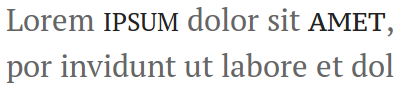
The ipsum sample to the left uses the standard PT Serif font with a reduced size and is a bit too skinny and narrow. The size-reduced PT Serif Caption sample to the right has a similar amount of stroke thickness as the rest of the letters and does not stand out too much.
… and other features
Besides adding small caps classes, Typogruby also
- avoids [widows][] by inserting an
before the last word, - replaces special characters such as
"quotes",...and---with “quotes”, … and —, - wraps the ampersand character & in
span.ampfor further styling, - and wraps the first quote in a starting line in
span.dquofor implementing hanging punctuation.
PT Serif Pro has small caps. But this font is not available via Typekit. And I am not sure to spend much money on a not-for-profit blog. [Paul Lloyd]: http://dribbble.com/shots/834370-Simulated-Small-Caps-for-PT-Serif [PT Serif Caption]: http://www.google.com/webfonts/specimen/PT+Serif+Caption [widows]: http://en.wikipedia.org/wiki/Widows_and_orphans